
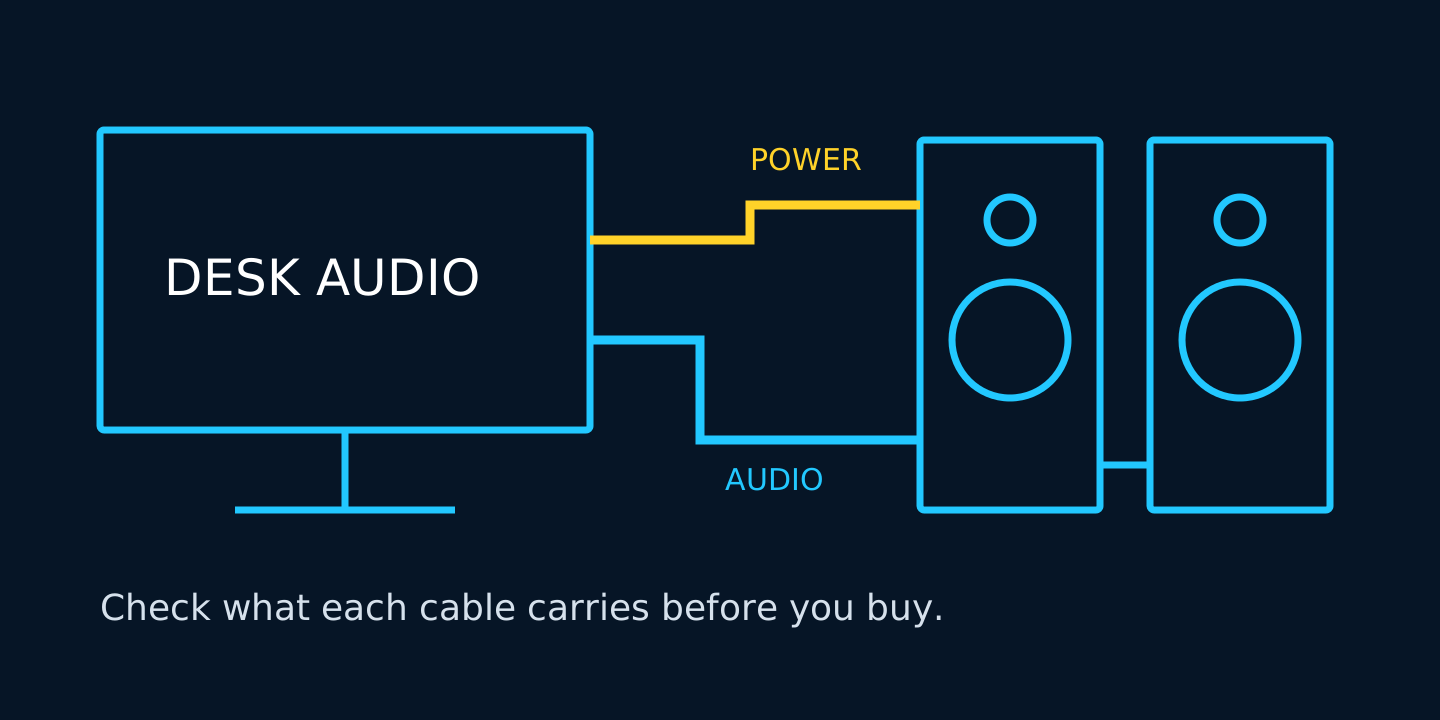
Most people buy desk speakers by style, then wonder why the bass is weak or why the PC will not send audio. "USB powered" tells you how a speaker gets power. It does not tell you how it will sound.
This guide covers what USB power can and cannot do, how to choose between a 1 cable and a 2 cable speaker, and the steps to fix common problems.
What "USB powered" really means
A USB port has a power limit. At 5 volts, standard USB 2.0 allows up to 500mA, or 2.5 watts, for a configured device. USB 3.0 allows up to 900mA, or 4.5 watts, for a compatible USB 3.0 device. As USB-IF’s power guidance explains, a USB 2.0 device stays limited to 500mA even on a standard USB 3.0 port. These are electrical input limits, not speaker audio output ratings.
USB-C can supply more power when the source, speaker and cable support the required power mode. The connector shape alone does not tell you how much power a speaker will receive.
That limit shapes the sound
- Volume and bass. Low notes demand power and suitable speaker drivers. Small USB speakers can suit desk-distance listening, but do not assume room-filling bass.
- Distortion at high volume. Crackling or cutouts can have several causes, including insufficient power, cables and audio settings. Lowering the volume is a useful first check.
- Shared power. Devices connected through an unpowered hub share its available power budget. Try connecting the speakers directly to the computer.
For a desk where you sit an arm's length away, USB power can be enough. For a living room or a loud party, consider speakers with their own power adapter and suitable output specifications.
1 cable or 2 cable: which one fits your desk
USB speakers usually arrive in one of two setups.
1 cable (USB carries power and audio). One plug, no separate audio lead. It is the tidiest option when you have a compatible free USB port. Sound quality depends on the speaker's built-in audio electronics, amplifier and drivers. Check operating system compatibility before buying.
2 cable (USB for power, 3.5mm cable for audio). Power comes from USB, while audio comes through a headphone or line output. It can work with older PCs and other devices that have a compatible audio output. The tradeoff is one more cable on your desk. A phone without a headphone jack needs a compatible audio adapter; consoles need a supported audio output too.
| Setup | Power path | Audio path | Windows output to select |
|---|---|---|---|
| 1 cable | PC USB port | Same USB cable | USB speakers or USB audio device |
| 2 cable | USB power source | 3.5mm audio output | PC headphone or speaker output |
Quick rule
- Pick 1 cable if you want a clean desk and your computer supports the speakers over USB.
- Pick 2 cable if your devices have a compatible 3.5mm audio output and you can provide the required USB power.
Buying checklist
Before you order, check these
- How it connects. 1 cable or 2 cable, and whether the plug is USB-A or USB-C. Match it to the ports you actually have free.
- Cable length. Measure from your PC to where the speakers will sit.
- Controls. A volume knob on the speaker is easier than reaching for a keyboard shortcut.
- Headphone jack. Handy if you switch between speakers and headphones. Check that the model includes one.
- Size and desk space. Leave room around your monitor and keyboard.
- Specs before you order. Sound is personal, so read the connection type, cable length and size closely. Returns cover items that arrive damaged, defective or incorrect.
Fix common problems on Windows
Start with the output and cable checks in Microsoft’s Windows audio troubleshooting guide. For 2 cable speakers, choose the PC's headphone or speaker output, not a USB speaker entry. Their USB lead supplies power only.
No sound at all
- 1. Right-click the speaker icon in the taskbar and open Sound settings.
- 2. Under Output, choose your USB speakers for a 1 cable model, or the headphone/speaker output for a 2 cable model.
- 3. Raise the volume in Windows and on the speaker itself.
- 4. Check that the speakers and the app are not muted in the volume mixer.
Speakers show up but stay silent
- 1. In Windows 11, open Settings > System > Sound > More sound settings, then select the Playback tab.
- 2. Right-click the correct playback output and choose Set as Default Device, if available.
- 3. Try a different USB port directly on the PC. For a desktop, a rear port is worth testing.
- 4. For a 2 cable model, check that the 3.5mm lead is in an audio output, not a microphone input.
Crackling, cutting out or low volume
- 1. Plug the speakers straight into the PC, not an unpowered hub.
- 2. Lower the volume slightly and test again.
- 3. Try another port or, if the lead is detachable, another suitable cable.
Buzzing or humming
- 1. Move the audio cable away from power cables.
- 2. Try a different USB port.
- 3. Unplug other nonessential USB devices one at a time to help isolate the source.
Sound only in one speaker
- 1. Check that the audio and speaker interconnect plugs are fully in.
- 2. In Sound settings, open the selected output device properties and check that left and right volume levels are even.
If none of this helps, test the speakers on another compatible device. If they work there, investigate your PC settings, ports or drivers. If they do not, contact the seller with the model and the tests you tried.
The short version
Keep these checks in mind
- USB power can suit desk listening, but does not guarantee big sound.
- 1 cable is tidier. 2 cable can suit more devices with a compatible audio output.
- Check the selected audio output, connections and power source before assuming the speakers are faulty.
Shopping for desk audio? Browse the audio collection and pick the setup that fits your desk.
USB desk speaker questions
Does USB powered mean USB audio?
No. A USB lead may supply power only. If the speakers also have a 3.5mm audio lead, connect that to a compatible audio output. Check the connection specification before you buy.
Will a USB 3.0 port make USB 2.0 speakers louder?
Do not assume it will. A USB 2.0 device remains subject to its supported power limit on a standard USB 3.0 port. Speaker design and amplifier limits also affect volume.
Can I use 2 cable speakers with my phone?
Only if the phone has a compatible headphone output or audio adapter, and the speakers receive the required USB power. A USB charging connection alone does not provide the analog audio signal.
Compare the current specifications, compatibility and prices in our desk setup collection and gaming gear collection before choosing your next upgrade.


